
CKA Exam Prep: Hands-On Study Plan for the Current Domains
Prepare for CKA by repeatedly administering and troubleshooting Kubernetes clusters against the current published domains.
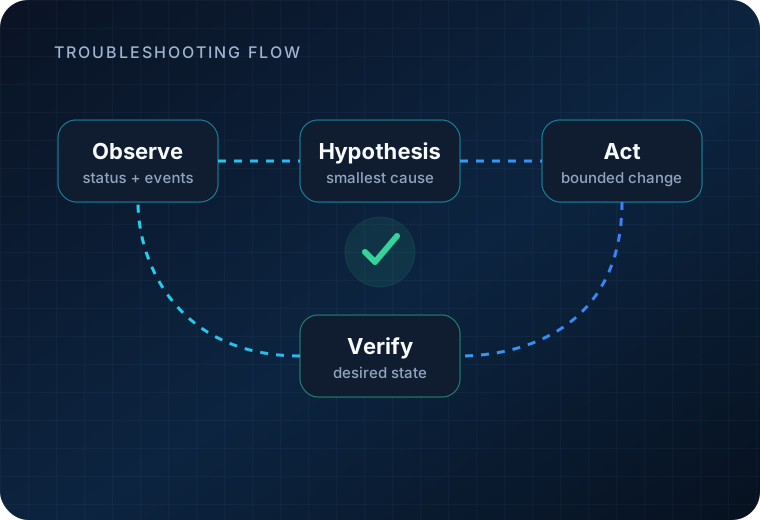
Build speed with kubectl, resource manifests and diagnosis, but make verification and troubleshooting the center of your practice. The current CKA is performance-based, so passive review alone is not enough.
If you are still deciding whether CKA is the right credential, use the CKA certification guide first.
Verify the exam version before you study deeply
As of 2026-09-30, Linux Foundation lists the CKA exam environment as Kubernetes v1.35.
Linux Foundation also says CKA is aligned to a recent Kubernetes minor version approximately 4–8 weeks after a Kubernetes release. That means a study plan can become stale even if the overall domains are unchanged.
Before your final preparation block:
- check the current CKA product page;
- confirm the Kubernetes version shown there;
- review the current CNCF curriculum/domains;
- make sure your practice cluster and documentation habits match the current version closely enough for the objectives.
Current CKA domain weights
| Domain | Weight |
|---|---|
| Troubleshooting | 30% |
| Cluster Architecture, Installation & Configuration | 25% |
| Services & Networking | 20% |
| Workloads & Scheduling | 15% |
| Storage | 10% |
Use these weights to allocate practice time, but do not ignore a lower-weight domain.
What should you practice for CKA?
Troubleshooting — 30%
Troubleshooting is the largest current domain.
Practice diagnosing situations such as:
- workloads that do not become ready;
- misconfigured services or endpoints;
- node and cluster-component problems;
- networking or DNS failures;
- scheduling failures;
- application failures where Kubernetes status and logs provide the clues.
Do not train yourself to make random changes until something works. Develop a sequence: inspect, form a hypothesis, make the smallest useful change, verify.
Cluster architecture, installation and configuration — 25%
Practice understanding and modifying the cluster itself.
Your preparation should make core cluster components, configuration, role-based access and maintenance tasks familiar enough that you can reason about them under time pressure.
Services and networking — 20%
Practice service discovery, exposure, network behavior and troubleshooting.
Networking mistakes can look like application mistakes. Build drills where you must distinguish a broken workload from a broken service, selector or network path.
Workloads and scheduling — 15%
Practice creating and modifying workloads, managing configuration, and controlling where workloads run.
Become fluent enough with imperative commands and YAML that you can choose the faster reliable method for the task rather than forcing one style every time.
Storage — 10%
Practice persistent volumes, claims, storage classes and workload-storage relationships from the current curriculum.
Ten percent is not zero; storage problems can also appear inside broader troubleshooting tasks.
Competency-to-practice drill matrix
Build drills from the published CKA competencies rather than from remembered test prompts. The exercises below are original practice tasks and do not reproduce confidential exam content.
| Public competency area | Original practice drill | Verification signals |
|---|---|---|
| Troubleshooting | Deploy a workload, then independently break its image reference, readiness configuration and Service selector. Diagnose each failure without making unrelated changes. Create a separate node/cluster-component fault in a disposable cluster and trace it from symptoms to component state. | kubectl get, describe, events, logs, node conditions, component/pod status, EndpointSlices |
| Cluster architecture, installation & configuration | In a disposable multi-node lab, use kubeadm to create or reconfigure a cluster; create a ServiceAccount/Role/RoleBinding; test authorization; render/apply one Helm or Kustomize-managed component; inspect a CRD/operator installation. |
kubectl auth can-i, node/control-plane health, rendered manifests, CRD/operator status |
| Services & networking | Expose a workload with a Service, verify endpoints, enforce a NetworkPolicy, test DNS through CoreDNS, and configure an Ingress or Gateway API route in a lab that supports it. | Service/EndpointSlice state, in-cluster DNS query, connectivity test, policy behavior, route status |
| Workloads & scheduling | Create a Deployment, perform a rolling update and rollback, consume ConfigMaps/Secrets, add resource requests/limits and node affinity, then diagnose an intentionally unschedulable Pod. | rollout status/history, Pod spec/env/volume state, scheduler events, node placement |
| Storage | Provision and consume a PVC, inspect StorageClass behavior, exercise access/reclaim settings in a supported lab, and diagnose a Pending claim or mount failure. | PVC/PV binding, StorageClass, events, Pod volume mounts |
Build two kinds of CKA practice environment
Use one fast-reset environment for repetition and one environment that exposes cluster-administration mechanics:
- a disposable local cluster for repeated workload, Service, networking and storage drills;
- a multi-node
kubeadmlab for cluster lifecycle, RBAC and control-plane practice; - snapshots or rebuild scripts so deliberate failures are cheap to reset;
- a Kubernetes version close to the currently listed exam version, while recognizing that the exam version can change.
Do not practice only against a managed service where control-plane tasks are hidden. The published CKA competencies include cluster creation/lifecycle and underlying infrastructure work.
A systematic CKA troubleshooting workflow
When a workload is failing:
- Confirm context and namespace.
- Inspect the object and its status/conditions.
- Read events before editing.
- Check dependent objects such as ConfigMaps, Secrets, Services, EndpointSlices, PVCs, ServiceAccounts or scheduling constraints.
- Use logs/output streams when the container actually starts.
- Check node/cluster state when the failure is broader than one workload.
- Make one targeted correction and verify the requested end state.
When networking is failing, verify the chain rather than guessing: Pod readiness → labels/selectors → Service/EndpointSlice → DNS → policy/routing. When storage is failing, verify StorageClass/PVC/PV binding before changing the workload.
CKA readiness criteria
You are approaching readiness when you can:
- move quickly between imperative commands and YAML without sacrificing correctness;
- identify why a Pod is Pending, CrashLooping or unreachable using status, events and dependent resources;
- build and verify RBAC without trial-and-error permission escalation;
- perform rollout/rollback, scheduling, Service/networking and storage tasks in mixed sessions;
- use official permitted documentation efficiently without relying on personal browser bookmarks;
- complete timed troubleshooting-heavy practice with enough time to verify every task.
A six-week CKA practice plan
This is an operational example, not an official or guaranteed timeline.
Week 1 — Baseline and command fluency
- Review the current domains.
- Build a disposable practice cluster.
- Create, inspect, edit and delete common resources.
- Establish a personal workflow for
kubectl get,describe, logs and output formatting.
Week 2 — Workloads and scheduling
- Deploy and modify workloads.
- Practice configuration and rollout tasks.
- Add scheduling constraints and diagnose unscheduled resources.
Week 3 — Services and networking
- Create services and verify endpoints.
- Practice DNS and network diagnosis.
- Build broken-selector and connectivity drills.
Week 4 — Cluster architecture and storage
- Work through cluster configuration and maintenance tasks in the current curriculum.
- Practice storage resources and common failure modes.
- Make sure you can verify state after changes.
Week 5 — Troubleshooting-heavy mixed sessions
Because troubleshooting is 30% of the published weight, dedicate a substantial block to broken-cluster and broken-workload scenarios.
Mix domains so you cannot predict the type of problem before you begin.
Week 6 — Simulator and timed correction
Use the included simulator to measure execution under time constraints.
After the attempt, classify misses:
- concept gap;
- command/YAML mistake;
- navigation/documentation delay;
- failure to verify;
- time-management problem.
Fix the category, not just the single missed task.
How to use documentation efficiently
Linux Foundation controls which resources are allowed inside the exam environment. The current Certification FAQ also states that personal browser bookmarks are not permitted.
Do not build an exam strategy around an old list of websites or personal bookmarks. Read the current Candidate Handbook and Resources Allowed policy shortly before the exam.
During practice, learn to find authoritative Kubernetes documentation quickly, but also learn enough command and object structure that basic tasks do not require a long search.
Build a fast verification loop
After every task:
- inspect the resulting resource;
- check status/conditions;
- confirm dependent objects such as selectors, endpoints, volumes or bindings when relevant;
- use logs/events when the expected state is missing.
A task is not complete because the command returned without an error.
Simulator strategy
The current CKA product includes two simulator attempts.
Use the first attempt to expose weak areas. Do not immediately repeat it just to improve a score from memory. Rebuild the weak skills in your own environment, then use the second attempt to test whether your process improved.
The simulator is preparation evidence, not a guarantee that the live exam will use the same tasks.
Exam-day preparation
Before exam day:
- confirm the current Kubernetes exam version;
- run the Linux Foundation system check;
- verify your identification details;
- reread the current resource/proctoring rules;
- make sure your physical setup meets the one-display, webcam and workspace requirements;
- schedule enough time that a technical setup issue does not force a rushed start.
When are you ready?
Use performance, not study hours.
You are closer to ready when you can:
- complete mixed tasks without excessive documentation searching;
- diagnose failures systematically;
- make Kubernetes changes confidently from both commands and manifests;
- verify every task;
- recover from mistakes without burning large amounts of time.
If practice shows that you actually want a developer or foundational credential instead, return to the Kubernetes certifications guide rather than forcing CKA.
Official training option
If you want an official Linux Foundation training product for Kubernetes administration, the owner-approved destination for this prep page is Kubernetes Fundamentals (LFS258). This is a training-course link, not CKA exam registration.
Affiliate disclosure: If you use this link, this site may earn a commission from a qualifying purchase. Merchant pricing, product contents, availability and other terms can change; verify the destination before purchase.
Explore Kubernetes Fundamentals (LFS258)
Still deciding whether CKA itself fits your role? Return to the CKA certification guide.
Sources and freshness
The public competency list, Kubernetes version, exam shape and resource-policy guidance were last verified 2026-09-30 from first-party sources. The practice drills on this page are original exercises derived from those public competencies; they are not exam questions.
- Linux Foundation Education — CKA certification and public domains/competencies
- CNCF — CKA certification
- Linux Foundation Education — Certification FAQ
- Linux Foundation — Certification Resources Allowed
The Kubernetes exam version and exam policies are high-change. Reverify them immediately before deployment and again before the exam.
Last verified: .