
LFCS Exam Prep: A Hands-On Study and Practice Plan
Prepare for LFCS by practicing the official administration tasks until you can complete them accurately under time pressure.
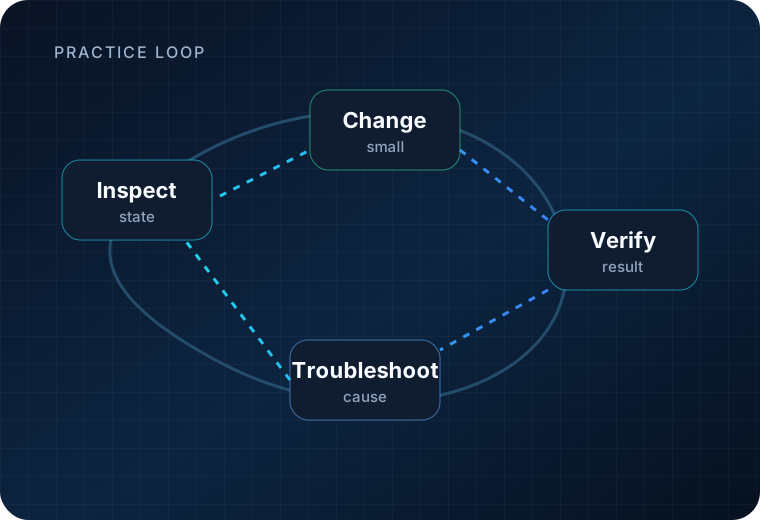
Use the current domains as your study boundary, build a repeatable Linux lab, practice without depending on open-web search, and use the included simulator as a timed diagnostic rather than as your only preparation.
This page is for people who have already chosen LFCS. If you are still deciding whether to buy the credential, start with the LFCS certification guide.
Start with the current LFCS exam shape
As of 2026-09-30, Linux Foundation describes LFCS as an online, proctored, performance-based exam with a two-hour time limit. The current domains are:
| Domain | Weight |
|---|---|
| Operations Deployment | 25% |
| Networking | 25% |
| Storage | 20% |
| Essential Commands | 20% |
| Users and Groups | 10% |
Linux Foundation also includes two simulator attempts with the current exam purchase. The simulator is useful because it gives you a timed environment, but your goal should be transferable administration skill rather than memorizing simulator questions.
What should you practice for LFCS?
Operations and deployment — 25%
Practice the complete lifecycle of a task:
- inspect the current state;
- make a change;
- persist it where required;
- verify the result;
- troubleshoot when verification fails.
Your practice should include processes and services, scheduled jobs, software packages and repositories, failure recovery, virtual machines, containers and SELinux tasks covered by the current objectives.
Networking — 25%
Networking is tied for the highest-weighted domain, so do not leave it until the final week.
Practice IPv4/IPv6 configuration, hostname resolution, time synchronization, network troubleshooting, SSH, packet filtering, routing, bridges/bonding, and the network-service tasks listed in the current objectives.
Do not only memorize commands. Break configurations deliberately and recover them.
Storage — 20%
Build and rebuild storage scenarios. Practice logical volumes, filesystems, swap, remote filesystems, automounting, and storage troubleshooting.
A useful habit is to verify every storage change with more than one signal: configuration files, mount state, block-device state, free space, or the service involved.
Essential commands — 20%
This domain rewards command-line fluency. Practice working with files, text, services, logs, system performance, disk-space problems, Git basics, and the other tasks in the official domain list.
Speed comes from repetition, but accuracy matters more than typing quickly.
Users and groups — 10%
Practice local account and group management, environment profiles, resource limits, ACLs, and directory-backed identity tasks included in the objectives.
Ten percent is still exam scope. Do not treat the smallest domain as optional.
Competency-to-practice drill matrix
Use the published competencies as boundaries, then create your own lab tasks. The drills below are original practice exercises, not reconstructed or confidential exam material.
| Public competency area | Original practice drill | Verification signals |
|---|---|---|
| Operations & deployment | On a disposable host, change one persistent kernel parameter, create or repair a systemd service, schedule a recurring job, add/validate a software repository, and run a container with a persistent configuration. On an SELinux-capable system, diagnose one intentionally blocked service action. |
sysctl, systemctl status, journalctl, scheduler output/logs, package-manager repo listing, container status/logs, SELinux audit output |
| Networking | Configure an address and route in a lab network, set hostname resolution, enable SSH, add a firewall/NAT rule, and build either a bridge or bond. Then break one element and restore connectivity. | ip addr, ip route, getent hosts, ss -lntup, SSH connection, firewall ruleset, interface state |
| Storage | Add a virtual disk, create LVM storage, format and mount it persistently, add swap, configure an automount or remote filesystem, then recover from one bad mount configuration. | lsblk, pvs/vgs/lvs, findmnt, df -h, swapon --show, boot-safe mount validation |
| Essential commands | Clone and update a small Git repo, diagnose a full filesystem, inspect service/resource pressure, and inspect an SSL certificate file. | Git status/log, du/df, process/service metrics, openssl x509 inspection |
| Users & groups | Create users/groups, apply an ACL, set a resource limit, adjust profile configuration, and verify identity resolution. If you have an LDAP lab, connect a test client and confirm directory-backed identity lookup. | id, getent, getfacl, login/profile behavior, resource-limit check |
Build a lab that supports the objectives
A useful LFCS lab is small and disposable:
- two Linux virtual machines so you can practice SSH, routing, name resolution and remote filesystems;
- at least one extra virtual disk for LVM, filesystems and swap;
- snapshots so you can deliberately break networking, storage or service configuration and recover;
- an SELinux-capable system for mandatory-access-control practice;
- a container engine and, where practical, a libvirt-capable host for the published container/VM competencies.
Use the package manager and network tooling native to the distribution you are practicing. LFCS is distribution-agnostic, so the point is to understand the administrative outcome and verification method rather than memorize one vendor-specific sequence.
A repeatable LFCS troubleshooting workflow
For each broken lab scenario:
- State the expected end state. Write down what should be running, mounted, reachable or resolvable.
- Observe before changing. Check service state, logs, routes, mounts, permissions, resource pressure and recent configuration.
- Narrow the subsystem. Decide whether the failure is service, network, storage, identity, permissions or policy.
- Make the smallest useful correction.
- Verify runtime state.
- Verify persistence. Confirm the fix survives the mechanism that matters: service restart, remount, reboot, new login or scheduled execution.
- Record the mistake pattern. Rebuild it later from memory.
LFCS readiness criteria
You are approaching readiness when you can repeatedly:
- finish mixed administration drills without open-web dependence;
- explain how you will verify a change before you make it;
- recover from a bad service, route, mount or permission change without rebuilding the whole machine;
- move between networking, storage and service work without losing your place;
- recognize when SELinux, ownership/ACLs or a runtime-vs-persistent configuration mismatch is the real cause;
- complete a timed mixed set with enough margin to recheck your work.
A six-week LFCS study plan
This is a planning example, not an official requirement or a guaranteed timeline. Compress or extend it based on your current Linux experience.
Week 1 — Baseline and lab setup
- Read the current official domains.
- Build one or more disposable Linux systems or virtual machines.
- Perform a baseline set of tasks without notes.
- Record where you lose time or need external help.
Week 2 — Operations and services
- Work through processes, services, jobs, packages and repositories.
- Practice recovery scenarios.
- Add container/VM and SELinux tasks from the current objectives.
Week 3 — Networking
- Configure addresses, routes and name resolution.
- Practice SSH and firewall tasks.
- Create troubleshooting drills where the failure is not obvious.
Week 4 — Storage plus users/groups
- Repeatedly create, resize, mount and troubleshoot storage.
- Practice swap and automounting.
- Add user, group, ACL and resource-limit drills.
Week 5 — Mixed timed sets
Stop studying by chapter. Mix the domains.
Give yourself a fixed time block and complete a sequence of unrelated administration tasks. The point is to practice context switching and verification under pressure.
Week 6 — Simulator, review, final correction
Use an official simulator attempt as a diagnostic. Afterward:
- list tasks you completed slowly;
- identify errors that came from misunderstanding versus typing/configuration mistakes;
- rebuild those scenarios in your own lab;
- run another timed mixed set.
Use the second simulator attempt when it will measure improvement, not immediately just to see the same environment again.
Practice a verification habit
For every task, answer three questions:
- What is the desired end state?
- What command or configuration creates it?
- How will I prove it worked?
This reduces a common performance-exam problem: finishing a command sequence without confirming the system is actually in the requested state.
Learn to recover from mistakes
Real administration includes failed assumptions. Practice:
- checking logs and service status;
- comparing configured state with runtime state;
- correcting permissions and ownership;
- reverting a broken network or storage change;
- identifying why a service will not start;
- finding which layer is actually failing before changing more settings.
Do not build a study plan that only rehearses perfect first attempts.
Know the exam-resource rules
Current Linux Foundation policy allows only specified resources within the exam environment. For LFCS, the Certification FAQ lists resources such as man pages, documentation installed by the distribution and permitted packages, while external web pages, notes, course manuals and outside devices are forbidden.
Personal browser bookmarks are not permitted.
Exam policies can change, so read the current Candidate Handbook, FAQ and allowed-resources policy immediately before your exam. Do not rely on an old study guide for proctoring or resource rules.
Final-week checklist
- [ ] Recheck the current LFCS domains.
- [ ] Recheck current exam rules and system requirements.
- [ ] Run at least one timed mixed-domain practice session.
- [ ] Review your slowest networking and storage tasks.
- [ ] Practice verification after every configuration change.
- [ ] Confirm your exam reservation, identity details and technical setup.
- [ ] Avoid learning large new topic areas at the last minute unless they are in the official objectives and you have a real gap.
How long should you study?
There is no responsible universal answer.
Someone who administers Linux daily may need mostly timed rehearsal and policy familiarization. Someone who has only followed tutorials may need substantially more hands-on repetition.
Use readiness criteria instead of a calendar:
- you can perform representative tasks without open-web dependence;
- you can verify your work;
- you recover from mistakes without starting over;
- you can finish mixed tasks inside a realistic time budget.
If you discover that the credential itself may not match your goals, return to the LFCS certification guide rather than forcing the prep plan.
Official training option
If you want an official Linux Foundation training product aligned to Linux system administration, the owner-approved destination for this prep page is Linux System Administration Essentials (LFS207). This is a training-course link, not LFCS exam registration.
Affiliate disclosure: If you use this link, this site may earn a commission from a qualifying purchase. Merchant pricing, product contents, availability and other terms can change; verify the destination before purchase.
Explore Linux System Administration Essentials (LFS207)
Still deciding whether LFCS itself is the right credential? Return to the LFCS certification guide.
Sources and freshness
The public competency list, exam shape and resource-policy guidance were last verified 2026-09-30 from first-party sources. The practice drills on this page are original exercises derived from those public competencies; they are not exam questions.
- Linux Foundation Education — LFCS certification and public domains/competencies
- Linux Foundation Education — Certification FAQ
- Linux Foundation — Certification Resources Allowed
- Linux Foundation — LFCS Important Instructions
Exam policies and allowed resources can change. Recheck the official LFCS page, Candidate Handbook and Resources Allowed policy shortly before the exam.
Last verified: .